← Home About Search
  • I Built a Shared Pin Board So I'd Stop Losing Things in iMessage

    Jul 31, 2026

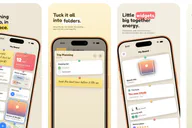
    I shipped an app today. It’s called Together Board, it’s on the App Store, and it runs on iPhone, iPad, Apple Watch, Mac, and Vision Pro. It is a cork board that you share with the people you love, and you stick things to it.

    Together Board on iPhone

    That’s the whole thing. That’s the pitch.

    I’ve been writing iOS software professionally since 2010, and I’ve built a lot of apps for a lot of clients. This is the first one in a while that started with something bothering me instead of something being asked of me.

    The itch

    I lose things digitally. Specifically, my Apple Notes is a collection of a lot of things that I’ve just lost over time. Scrolling back through my list of notes is like digging through an archeologist’s dream world. When I got married last year, I knew that I had to be better at remembering things.

    That’s why I started working on this app last November. I really just wanted a way to share into a digital pin board that me and my spouse could easily look at quickly to find upcoming invitations (digital and physical), count downs to vacations, little notes that we’d leave each other in the morning, and so much more.

    What I kept coming back to is that a message thread is a river. Things go in, they float past, and then they’re gone downstream. You can technically go find them again, and you technically never will. Everything important in a relationship ends up in a river, and rivers are terrible at holding things.

    What I wanted was a wall. Something where you put a thing in a place and it stays in that place, and next Tuesday when you look at the wall, it’s still right there where you left it.

    Enter Together Board, a digital version of the tried and true pin board on your wall, but this one lets you carry it around (without impaling yourself with pins).

    Why a cork board

    Once I had “wall,” the design mostly wrote itself.

    I didn’t want a feed. Feeds are rivers with extra steps, and they carry an implicit judgment about what matters — algorithmic or chronological, either way something upstream decides. A board doesn’t decide anything. You put the important thing in the middle and the dumb thing in the corner and that’s the end of it.

    I also wanted it to be a little bit silly. There’s a school of design where everything shared between two people has to be tasteful and restrained and slightly gray. But an actual cork board in an actual kitchen has a birthday card and a takeout menu and a drawing of a horse on it. The horse isn’t just decoration. The horse is arguably the whole point.

    So: pushpins. Cards that tilt a few degrees. Sticky notes in handwriting. Physics on the pins when you drag them.

    Watch the Together Board walkthrough

    The interaction model that took the longest to get right was the flipping open of a folder to match the style. I didn’t just want to push on another pinboard, I want it to feel like you were actually opening a folder on your pin board.

    No accounts, no server, no me

    The decision I feel best about is the one that made everything else harder: Together Board has no backend.

    There’s no sign-up. No email, no password, no “continue with.” Your board lives in your iCloud, and when you invite someone, it’s shared through CloudKit directly between you in your private database. I don’t have a database. I don’t have a users table. If you emailed me tomorrow and asked me to look at your board, I couldn’t — there’s nothing to look at.

    This is partly principle. I did not want to be in the business of holding the private, unguarded, occasionally embarrassing contents of other people’s relationships. That’s a thing you can only really guarantee by not having it in the first place. And a shared board is specifically the kind of data I’d feel worst about holding — it’s not documents, it’s the texture of somebody’s life.

    It’s also, frankly, practical. I’m one person with a day job. A backend is a thing that goes down at 3am, costs money whether or not anyone’s paying you, needs to be patched, and turns into a liability the moment it has enough data on it to be worth stealing. CloudKit means Apple runs the thing that has to stay up, and the cost of an inactive user is zero.

    Five platforms, one person

    The app ships on iPhone, iPad, Watch, Mac, and Vision Pro. People keep asking how, and the honest answer is: SwiftUI, plus a lot of restraint about what each platform gets.

    The Watch app was the one I was most stubborn about. Even though I’ve written a book on how to make WatchKit-based apps, most people don’t really use apps on their wrist unless it’s a fitness app. But nonetheless, I wrote a watchOS version. You can browse your boards, check off a to-do, vote in a poll, check in on a habit, and record a voice note straight to the board. It’s the feature I demo first and it’s the one that makes people’s eyebrows go up.

    Thanks to App Intents, the content you put in the app also lives outside of it on iOS, iPadOS, and macOS. Easily add a note from Siri to your board, share items into the board through a Share Extension in another app and watch the content instantly pop into Together Board and sync across all of your devices and your partner’s devices.

    There’s also Shortcuts support, which lets you grab content out of a board, add content to a board, and do it all with workflows, making this a very powerful application.

    Widgets are another way that you can view the content outside of the app: See recent pins on your Home Screen, or countdown to that next vacation (you deserved it, by the way).

    What I cut

    More than I kept. I thought about adding a web app, a full size pin board that lets you customize the size of the board, a social networking layer, and even building my own back end service for this, but at the end of the day, the feature set that I ended up with is something that’s not just useful, but easy to use, understand, and live with daily.

    Ten languages

    Together Board is localized into ten languages — English, plus German, Spanish, French, Italian, Dutch, Brazilian Portuguese, Japanese, Korean, and Simplified Chinese — across the app, the widgets, the Watch app, and the share sheet.

    This is my first app in years that I’ve developed that includes localization. I forgot the difficulty involved in breaking out strings files for each language, then translating those into the various languages. I had Claude help with that, and it did an awesome job (certainly better than a lot of low-budget translations consultants).

    Being able to have this app in the hands of users around the world, in their own language, is very important, and I’m glad I was able to translate the app in this first version.

    What it costs

    Free gets you a board and a few pins. Pro is $9.99 a year, or a $39.99 Lifetime Pass — pay once, keep it forever, including every update I ever ship.

    I put the lifetime option in because I wanted it to exist. I’m tired of renting software, and it felt hypocritical to build a subscription-only app while complaining about subscription-only apps. The math is worse for me and better for you, and I decided I could live with that.

    Remember that when you purchase an application, or buy a subscription, for an independently developed application, you’re directly helping that developer with their expenses, and helping them and their families. Building applications isn’t cheap and launching new ones is a hit and miss that sometimes ends up costing a lot of money.

    Know that your contribution directly helps me, and doesn’t disappear into a large company where it makes no difference.

    What’s next

    I’m actively looking at a lot of new feature requests from our more than 400 beta testers! From additional widgets, to a native visionOS app that lets you pin items to your physical space, to better handled push notifications (right now notification delivery is at the whim of Apple’s iCloud background sync service).

    Mostly, though, what’s next is listening. I’ve built this in a vacuum for nine months and I have opinions about how people will use it that are probably wrong. The first few weeks of a small app are the only time you get honest, unfiltered mail from people who have no reason to be nice to you, and I intend to read all of it.

    The ask

    If any of this sounds like something you’d use — Together Board is on the App Store. It’s free to try. You can also read more about it at rapidsilence.com/togetherboard.

    And if you do try it and it’s good, a rating helps more than you’d think. A new app with no ratings is functionally invisible in there, and I’m one guy without a marketing budget.

    If it’s bad, tell me directly — support@rapidsilence.com. I’ll fix it faster than you’d expect.

    Pin something small today. It adds up to something lovely.

  • Shortcut for creating meeting notes in Apple Notes

    Feb 2, 2022

    The Apple Shortcuts app icon on the iOS Home Screen.

    Shortcuts is an amazing tool that I’ve been using to create custom automations for years on iOS. I’m so happy that it’s finally made its way to the Mac in macOS Monterey, where I’ve been putting it to good since its inception.

    I have roughly 90 Shortcuts in my library, but one that I use frequently throughout the day is one that I built when I migrated back to Apple Notes from Craft. This shortcut tries to replicate the functionality I missed from the migration: Being able to stand up a note from a calendar event.

    Download the Shortcut here

    This Shortcut I created searches through your calendar events to find events occurring “today,” that are not all day events (you can change this if you find yourself needing to create notes around all day events), then it presents a list of these events, and lets you choose one to create a note for it.

    The Shortcut editor showing the meeting notes shortcut opened.

    The Title, Start Date, End Date, and Attendees list are all retrieved from the calendar item, then a Note is created using those fields, and finally the Note is shown inside of Apple Notes and you’re off to the races and ready to begin typing.

    To configure this shortcut, be sure to select a new location to store the new note inside of Apple Notes (currently I have a “Meeting Notes” folder where I store all of these).

    Header Photo by Dimitri Karastelev on Unsplash.

  • BluSaver — A macOS screensaver featuring Blu

    Oct 14, 2020

    A few years ago, my friend and graphic designer co-worker, Cat Lo created a set of stickers for iOS of her Scottish Fold cat named “Blu.” Those stickers turned out to be a hit, and last year, I helped her develop a new set of animated stickers for iOS 13 dubbed Blu Animated Stickers, which received an update this year for the pandemic sticker pack, featuring re-creations of favorite Giphy moments and inside jokes that everyone has enjoyed.

    This month, Cat created a fancy Lo-Fi video on YouTube complete with a soundtrack that was custom made for the video. It’s a great relaxing video to watch while you’re coding, working, or just chilling at home.

    I loved the video so much, that I ended up creating a macOS Screen Saver based on it. That was a fun experience of working with Apple’s new notarization framework to get the screen saver file notarized so it would run without issues on modern versions of macOS.

    The screen saver has quickly become one of my favorites, so I decided to share it with everyone with the blessing of Cat. You can download it here and install it on your own Mac.

    If you enjoy the screen saver and the iOS sticker pack, be sure to give @CatLo a shout on Twitter.

  • Conferences in 2020

    Aug 29, 2020

    2020 has certainly been a challenging year for many due to the COVID-19 pandemic that’s swept the world. Many companies are enforcing working from home as its main strategy now, and even more (rightfully so) aren’t requiring any travel. I, myself, haven’t traveled anywhere except to get essentials since at least early March, and the company that I work for has suspended all travel for the foreseeable future. We certainly don’t know when this pandemic will stop, but life has to begin to operate again at some capacity.

    WWDC

    The first sign that we saw of some normalcy in the tech community was Apple continuing their WWDC conference, which kicked off the week of June 22, 2020. This year the conference was entirely online and pre-recorded. To me, this made the conference even better, and dare I say: This was the best version of WWDC that I’ve ever witnessed in the 15 years that I’ve been watching them. The fact that the keynote was pre-recorded left Apple with an enormous creative pool from which to draw from to make the nearly 2 hour video engaging and entertaining.

    The session videos also had amazing production value and were able to be shorter and more concise, even though they contained the same information as would’ve been presented on stage. A lot of this was due to the fact that they didn’t have to shuffle people in and out of a physical space, or deal with the dreded live demo bugs that crop up in seemingly every live demo at WWDC. The recorded videos were also available immediately due to the fact that Apple didn’t have to send them to post production to iron out any issues. I was able to glean information a lot quicker and begin implementing the new technology sooner thanks to the shorter sessions that had an almost “live code-along” feel.

    Many may know that I’ve not been to WWDC since 2015 due to the cost and the seemingly increasing difficulty rate of actually getting a ticket to the conference. In fact, I’ve never won the ticket lottery for WWDC, and the whole exclusiveness of it is a bit off-putting — even when I was just starting out in iOS development, the sheer cost of a ticket was unimaginable for a high school and then college student. The fact that the conference was available exclusively online and free to everyone this year has surely helped keep more people from feeling excluded from this amazing developer community.

    360 iDev 2020

    One of the conferences that I love, but have never been able to attend in person due to schedule/travel conflicts is 360 iDev. I’ve attended their 360 iDev [min] conferences before, but not the main conference. 360 iDev is a community-driven Apple developer conference held in Denver, Colorado, that focuses on a lot more than just the technical details of how to implement a List view in SwiftUI. It delves into the impacts of tech in our world, and touches on topics that are much needed to make developers better people as well as better developers. For example, this year’s Keynote touched on the social impacts currently ongoing in the US; another session touched on how to make user interfaces more accessible for users of all types. Sessions like these set 360 iDev apart from many other developer conferences.

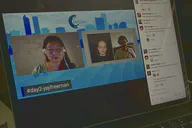
    This year, the conference was forced to move online due to social distancing guidelines. Depsite having to accomodate this new format, the conference moved on with all 3 days filled with great content, great speakers, and lively Slack rooms filled with chatter.

    The conference utilized hopin.to to handle the video streams, and even had a Chat Roulette style feature that let you meet face-to-face with conference attendees and sponsors to swap contact information, or just catch up. This was definitely a next-level virtual conference experience that left me fully engaged with the speakers and their presented content.

    Wrapping up

    This year has been anything but normal, but I’ve loved being able to continue to connect with the developer community, to continue to learn about exciting new tech, and grow as a community in our changing (and challenging) world. Both of these conferences have helped me to do that, and I’m extremely grateful to both Apple and 360 iDev for continuing to go ahead with their conferences this year.

    I hope that if WWDC is fully virtual again next year, they follow a similar path as 360 iDev did with the ability to chat with attendees, or even have face-to-face enagement. I feel that really the only aspect I missed from WWDC was bumping into developers and being able to talk about things or catch up.

  • Hello, World (again)...

    Jul 27, 2020

    I’ve had a Micro.blog account since the very beginning. I was a Kickstarter backer, but never quite found a use for it when it launched. I could never determine if I wanted to use it to blog with, or use it as a Twitter replacement, or both.

    When I was searching for a blogging platform to run my new website off of, I quickly rediscovered Micro.blog and decided to give it a go for my personal website.

    We’ll see how this experiment goes, especially as I attempt to start writing a bit more (both long and short posts) on my personal website. The posts may be a bit infrequent in the beginning, but I’m hoping to start getting on a schedule that will let me post more frequently about topics that I love: technology, Apple, software development, and some hobbies that I’ve taken up over the past year like learning to play piano.

    Looking forward to starting this new journey and seeing where it goes…

  • RSS
  • JSON Feed
  • GitHub