
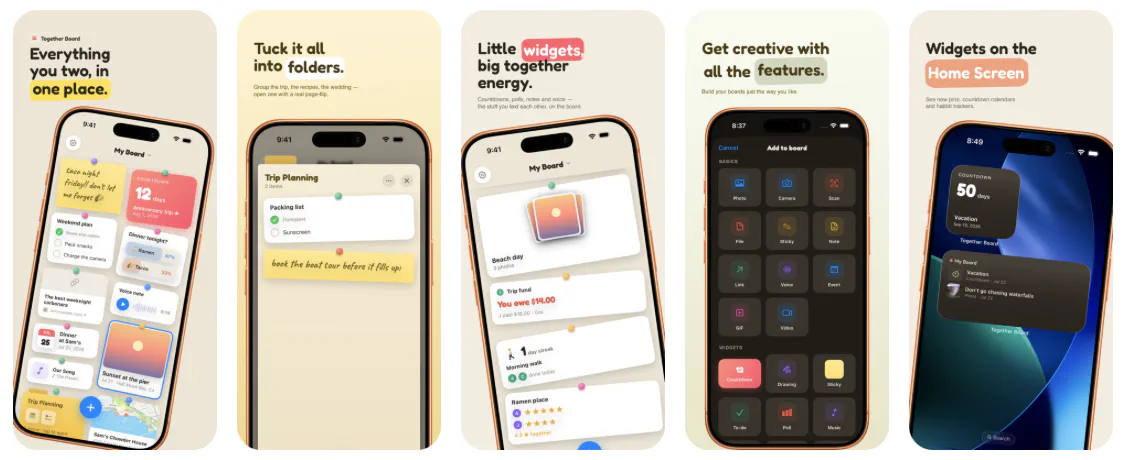
I shipped an app today. It’s called Together Board, it’s on the App Store, and it runs on iPhone, iPad, Apple Watch, Mac, and Vision Pro. It is a cork board that you share with the people you love, and you stick things to it.
That’s the whole thing. That’s the pitch.
I’ve been writing iOS software professionally since 2010, and I’ve built a lot of apps for a lot of clients. This is the first one in a while that started with something bothering me instead of something being asked of me.
The itch
I lose things digitally. Specifically, my Apple Notes is a collection of a lot of things that I’ve just lost over time. Scrolling back through my list of notes is like digging through an archeologist’s dream world. When I got married last year, I knew that I had to be better at remembering things.
That’s why I started working on this app last November. I really just wanted a way to share into a digital pin board that me and my spouse could easily look at quickly to find upcoming invitations (digital and physical), count downs to vacations, little notes that we’d leave each other in the morning, and so much more.
What I kept coming back to is that a message thread is a river. Things go in, they float past, and then they’re gone downstream. You can technically go find them again, and you technically never will. Everything important in a relationship ends up in a river, and rivers are terrible at holding things.
What I wanted was a wall. Something where you put a thing in a place and it stays in that place, and next Tuesday when you look at the wall, it’s still right there where you left it.
Enter Together Board, a digital version of the tried and true pin board on your wall, but this one lets you carry it around (without impaling yourself with pins).
Why a cork board
Once I had “wall,” the design mostly wrote itself.
I didn’t want a feed. Feeds are rivers with extra steps, and they carry an implicit judgment about what matters — algorithmic or chronological, either way something upstream decides. A board doesn’t decide anything. You put the important thing in the middle and the dumb thing in the corner and that’s the end of it.
I also wanted it to be a little bit silly. There’s a school of design where everything shared between two people has to be tasteful and restrained and slightly gray. But an actual cork board in an actual kitchen has a birthday card and a takeout menu and a drawing of a horse on it. The horse isn’t just decoration. The horse is arguably the whole point.
So: pushpins. Cards that tilt a few degrees. Sticky notes in handwriting. Physics on the pins when you drag them.
The interaction model that took the longest to get right was the flipping open of a folder to match the style. I didn’t just want to push on another pinboard, I want it to feel like you were actually opening a folder on your pin board.
No accounts, no server, no me
The decision I feel best about is the one that made everything else harder: Together Board has no backend.
There’s no sign-up. No email, no password, no “continue with.” Your board lives in your iCloud, and when you invite someone, it’s shared through CloudKit directly between you in your private database. I don’t have a database. I don’t have a users table. If you emailed me tomorrow and asked me to look at your board, I couldn’t — there’s nothing to look at.
This is partly principle. I did not want to be in the business of holding the private, unguarded, occasionally embarrassing contents of other people’s relationships. That’s a thing you can only really guarantee by not having it in the first place. And a shared board is specifically the kind of data I’d feel worst about holding — it’s not documents, it’s the texture of somebody’s life.
It’s also, frankly, practical. I’m one person with a day job. A backend is a thing that goes down at 3am, costs money whether or not anyone’s paying you, needs to be patched, and turns into a liability the moment it has enough data on it to be worth stealing. CloudKit means Apple runs the thing that has to stay up, and the cost of an inactive user is zero.
Five platforms, one person
The app ships on iPhone, iPad, Watch, Mac, and Vision Pro. People keep asking how, and the honest answer is: SwiftUI, plus a lot of restraint about what each platform gets.
The Watch app was the one I was most stubborn about. Even though I’ve written a book on how to make WatchKit-based apps, most people don’t really use apps on their wrist unless it’s a fitness app. But nonetheless, I wrote a watchOS version. You can browse your boards, check off a to-do, vote in a poll, check in on a habit, and record a voice note straight to the board. It’s the feature I demo first and it’s the one that makes people’s eyebrows go up.
Thanks to App Intents, the content you put in the app also lives outside of it on iOS, iPadOS, and macOS. Easily add a note from Siri to your board, share items into the board through a Share Extension in another app and watch the content instantly pop into Together Board and sync across all of your devices and your partner’s devices.
There’s also Shortcuts support, which lets you grab content out of a board, add content to a board, and do it all with workflows, making this a very powerful application.
Widgets are another way that you can view the content outside of the app: See recent pins on your Home Screen, or countdown to that next vacation (you deserved it, by the way).
What I cut
More than I kept. I thought about adding a web app, a full size pin board that lets you customize the size of the board, a social networking layer, and even building my own back end service for this, but at the end of the day, the feature set that I ended up with is something that’s not just useful, but easy to use, understand, and live with daily.
Ten languages
Together Board is localized into ten languages — English, plus German, Spanish, French, Italian, Dutch, Brazilian Portuguese, Japanese, Korean, and Simplified Chinese — across the app, the widgets, the Watch app, and the share sheet.
This is my first app in years that I’ve developed that includes localization. I forgot the difficulty involved in breaking out strings files for each language, then translating those into the various languages. I had Claude help with that, and it did an awesome job (certainly better than a lot of low-budget translations consultants).
Being able to have this app in the hands of users around the world, in their own language, is very important, and I’m glad I was able to translate the app in this first version.
What it costs
Free gets you a board and a few pins. Pro is $9.99 a year, or a $39.99 Lifetime Pass — pay once, keep it forever, including every update I ever ship.
I put the lifetime option in because I wanted it to exist. I’m tired of renting software, and it felt hypocritical to build a subscription-only app while complaining about subscription-only apps. The math is worse for me and better for you, and I decided I could live with that.
Remember that when you purchase an application, or buy a subscription, for an independently developed application, you’re directly helping that developer with their expenses, and helping them and their families. Building applications isn’t cheap and launching new ones is a hit and miss that sometimes ends up costing a lot of money.
Know that your contribution directly helps me, and doesn’t disappear into a large company where it makes no difference.
What’s next
I’m actively looking at a lot of new feature requests from our more than 400 beta testers! From additional widgets, to a native visionOS app that lets you pin items to your physical space, to better handled push notifications (right now notification delivery is at the whim of Apple’s iCloud background sync service).
Mostly, though, what’s next is listening. I’ve built this in a vacuum for nine months and I have opinions about how people will use it that are probably wrong. The first few weeks of a small app are the only time you get honest, unfiltered mail from people who have no reason to be nice to you, and I intend to read all of it.
The ask
If any of this sounds like something you’d use — Together Board is on the App Store. It’s free to try. You can also read more about it at rapidsilence.com/togetherboard.
And if you do try it and it’s good, a rating helps more than you’d think. A new app with no ratings is functionally invisible in there, and I’m one guy without a marketing budget.
If it’s bad, tell me directly — support@rapidsilence.com. I’ll fix it faster than you’d expect.
Pin something small today. It adds up to something lovely.